Introducing Competitors & Trends: See What Works for Them, Then Make It Yours

Karl Geoffrey
November 10, 2026

Every social media manager has done it. You open a competitor's profile "just to check", scroll for twenty minutes, screenshot a few posts that did well, and drop them in a folder you never open again.
Today that changes. Competitors & Trends is live in CoPost. It's the fastest way we know to go from "that post did really well for them" to "our version is scheduled for Thursday".
What is Competitors & Trends?
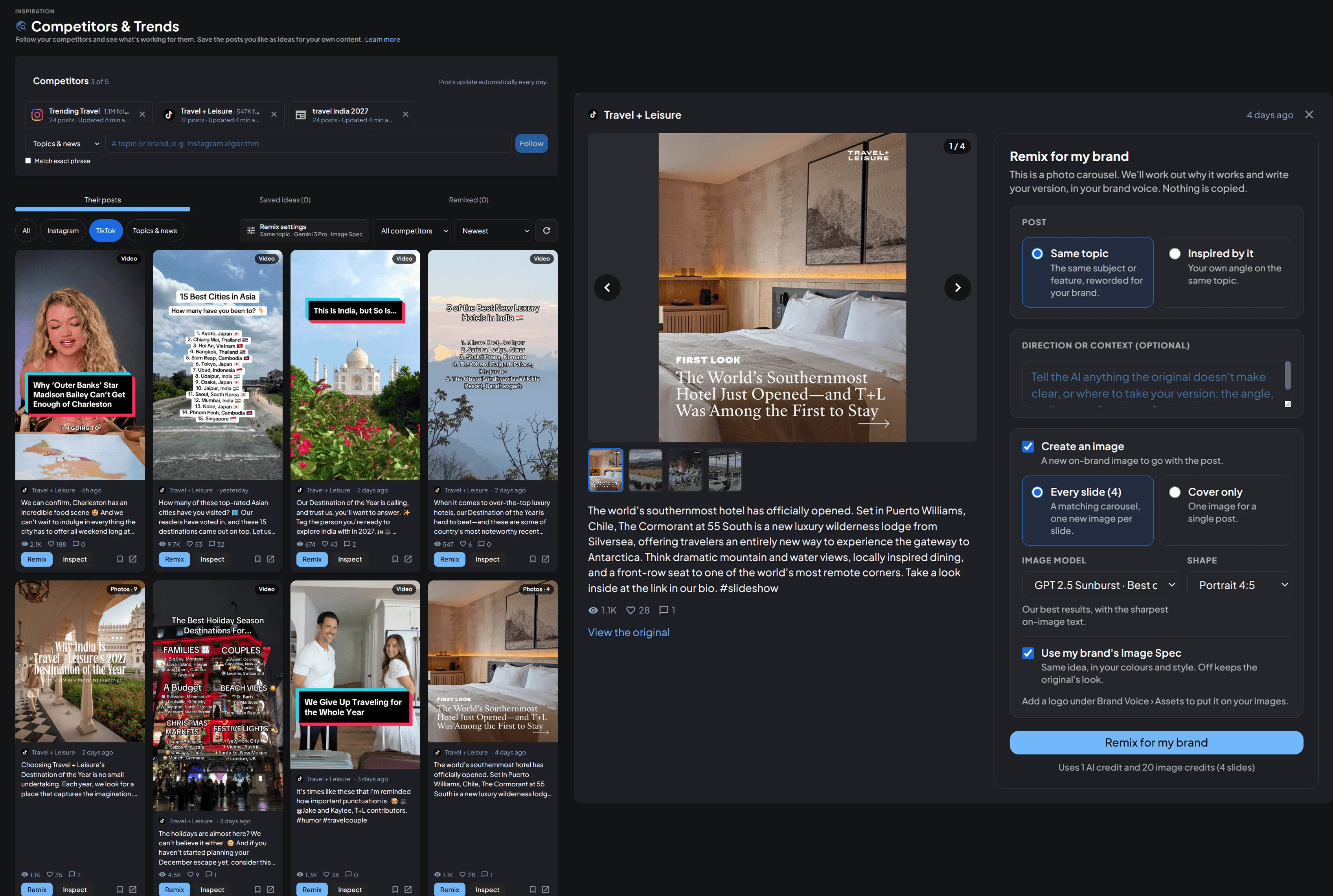
Competitors & Trends lives in the new Inspiration section of your CoPost sidebar. It does three things:
- Follows the accounts you keep an eye on anyway: competitors, creators you admire, and the topics and news in your industry.
- Shows you what's working, by ranking every post against that account's own average.
- Remixes the best ideas for your brand with AI, then schedules them in one click.
No more spreadsheets of screenshots, and no more guessing which posts are worth learning from.
Follow anyone public
Add any public Instagram business or creator account, TikTok profile or YouTube channel. You can also follow a topic or brand in the news, like "specialty coffee" or a competitor's company name, and CoPost brings in the latest articles about it.
CoPost collects their latest posts into one feed and keeps it up to date for you. That's every day on Creator Pro, Teams and Agency, and every three days on Creator. You never have to open their profiles again.
See which posts are really working
Likes on their own don't tell you much. A big account always gets more than a small one. So CoPost compares every post with that account's own average. A post doing 3× their usual engagement gets flagged as a top performer, whatever the account's size.
Sort the feed by best performing, filter by platform or competitor, and see straight away what kind of post it is: a Reel, a carousel (with every slide), a YouTube Short, or even an ad. Save anything interesting to Saved ideas for later.
Remix it for your brand
This is where it gets exciting. Click Remix on any post and CoPost's AI works out why it works, then writes your version. It writes in your brand voice from your Brand Brief, and nothing is copied.
You choose how close to stay:
- Same topic: the same subject, reworded for your brand.
- Inspired by it: your own angle on the topic, like a related tip, opinion or use case.
Want to steer it? Add a note in Direction or context: the audience, the product to focus on, or something the original doesn't make clear.
Then pick what comes with it:
- A new image in your brand's colours and style using your Image Spec, with your logo if you like.
- A whole carousel. For a carousel, CoPost can rebuild every slide so the set looks like one consistent carousel in your style.
- A video script. For Reels, TikToks and YouTube videos, you get a short script to film, or send it straight to CoDirector to make an AI avatar video.
You can turn on Remix settings once and use them every time. Remixes run in the background, so you can keep browsing while they're made. You'll get a heads-up when each one is ready.
Remix a single post from a link
Saw a great post somewhere else? Choose Paste a post link, drop in a public LinkedIn, X or TikTok post, or any article or blog post, and remix it. You don't need to follow the account. It works with text, image and carousel posts.
Turn a news article into a carousel
News articles are often long, and the best way to share one is usually a carousel. Open any article in your feed, choose Carousel, and pick how many slides you want, or let CoPost decide.
CoPost reads the whole article and comes back with a plan: a caption, and what goes on each slide in plain words, like a headline and a line or two of text. Nothing is made yet. Edit the caption, rewrite a slide, reorder them, add or remove slides, and only then click Create carousel.
Planning costs 1 AI credit. You only spend image credits once you're happy with the plan, so you never pay for slides you'd throw away.
From idea to scheduled in one click
When you're happy with a remix, send it straight into one of your Post Slot Collections. It takes the next free slot and goes out to that collection's accounts.
CoPost fits the caption to every platform. Where a caption is too long, that platform gets a shorter version, or a thread on X, Bluesky and Threads. Prefer to tweak it first? Save it as a draft and finish it in Composer.
What's included in each plan
| Plan | Competitors & topics per Brand Space | Feed updates |
|---|---|---|
| Creator | 2 | Every 3 days |
| Creator Pro | 5 | Daily |
| Teams | 5 | Daily |
| Agency | 10 | Daily |
Remixes use your AI credits: 1 AI credit for the post, plus image credits for any images. A news carousel uses 1 AI credit to plan, then image credits for each slide. Every new account gets a 30-day free trial with daily updates, so you can try it all properly.
Get started
Competitors & Trends is live in your CoPost dashboard today. Open Inspiration > Competitors & trends in the sidebar, follow your first few accounts, and your feed will be ready in a few minutes.
Read the full guide in our help centre: How to use Competitors & Trends.
New to CoPost? **Start your free 30-day trial →** No card required.